Bite Window — Solunar Watch Face
$2.99
Solunar major and minor feeding periods, moon phase, and a countdown to the next bite window.
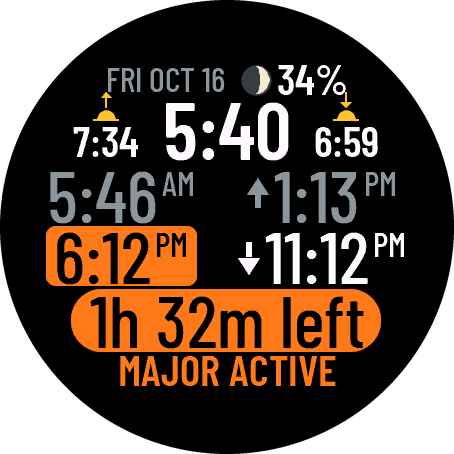
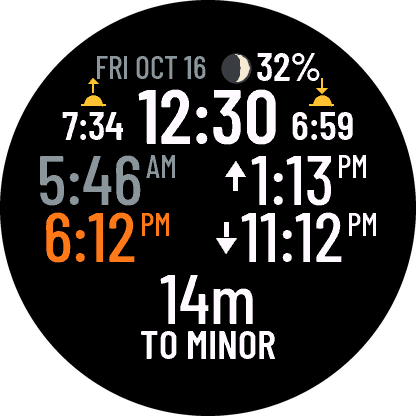
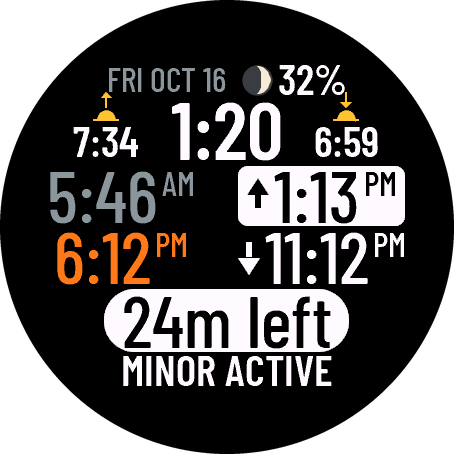
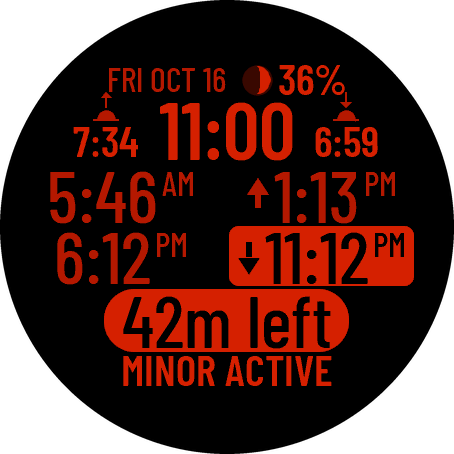
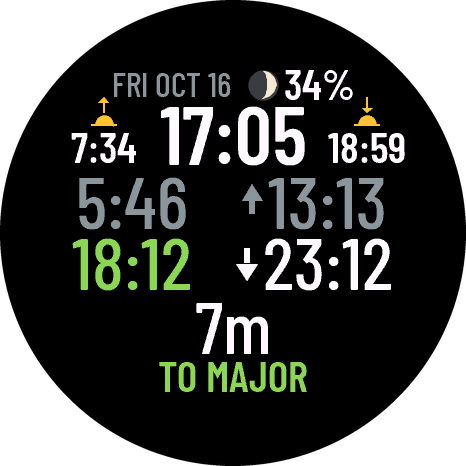
Know when the next bite window opens, at a glance.
Bite Window is a solunar watch face for hunters and anglers. It shows today's two major and two minor periods in big type, counts down to the next one, and tells you when you are inside one and how long it has left. Everything is calculated on your watch: no phone, no internet, no subscription.
THE PERIODS
- Two MAJOR periods, centered on the moon overhead and the moon underfoot (2 hours by default).
- Two MINOR periods, centered on moonrise and moonset (1 hour by default), with up and down arrows.
- Past periods dim, the active one is highlighted.
- Countdown: "1h 24m TO MAJOR". Inside a period: "1h 12m left, MAJOR ACTIVE".
- Days without a moonrise, moonset or transit (it happens about once a month) show "--" instead of a made-up time.
- Major and minor period lengths are adjustable: 1.5, 2 or 3 hours and 30 minutes, 1 or 1.5 hours.
THE MOON AND THE SUN
- Moon phase drawn on the face with the percentage illuminated.
- Moonrise and moonset times (the minor periods).
- Sunrise and sunset beside the clock (can be turned off).
ACCURATE AND OFFLINE
The face calculates the moon's position on the watch with standard astronomical formulas (Meeus) and your last known location. Checked against the US Naval Observatory: moonrise, moonset and transit times within 1 minute, illumination within 1%. No data connection is needed, ever.
EASY TO READ
- Big type: the clock, the countdown and every period time are at least 45 pixels tall.
- High-contrast colors, five accent colors (blaze orange, moss green, lake blue, gold, white).
- Red night mode for the blind or the boat before dawn: always on, or automatic after sunset. Touch and hold to flip it.
- Battery-friendly always-on display: large thin clock and "MAJOR in 1h 24m", moved every minute to protect the screen.
- 12- or 24-hour time. Settings in the Connect IQ app or on the watch (Customize).
LOCATION
Bite Window uses the last position your watch already knows. If it has none, it shows NEED LOCATION: start any GPS activity once (or sync weather in Garmin Connect). It never turns on GPS by itself, and your location never leaves the watch.
IMPORTANT
Solunar periods are traditional predictions of when fish and game may be more active, not guarantees. Weather, barometric pressure, the season and how busy the spot is matter too. Always follow your local hunting and fishing regulations, including legal shooting hours, seasons and limits.
Supports AMOLED Forerunner, fenix, epix, Venu, vivoactive, Instinct AMOLED, MARQ, Descent, D2 and Approach watches.
Questions: support@dhstrat.com
THE PERIODS
- Two MAJOR periods, centered on the moon overhead and the moon underfoot (2 hours by default).
- Two MINOR periods, centered on moonrise and moonset (1 hour by default), with up and down arrows.
- Past periods dim, the active one is highlighted.
- Countdown: "1h 24m TO MAJOR". Inside a period: "1h 12m left, MAJOR ACTIVE".
- Days without a moonrise, moonset or transit (it happens about once a month) show "--" instead of a made-up time.
- Major and minor period lengths are adjustable: 1.5, 2 or 3 hours and 30 minutes, 1 or 1.5 hours.
THE MOON AND THE SUN
- Moon phase drawn on the face with the percentage illuminated.
- Moonrise and moonset times (the minor periods).
- Sunrise and sunset beside the clock (can be turned off).
EASY TO READ
- Big type: the clock, the countdown and every period time are at least 45 pixels tall.
- High-contrast colors, five accent colors (blaze orange, moss green, lake blue, gold, white).
- Red night mode for the blind or the boat before dawn: always on, or automatic after sunset. Touch and hold to flip it.
- Battery-friendly always-on display: large thin clock and "MAJOR in 1h 24m", moved every minute to protect the screen.
- 12- or 24-hour time. Settings in the Connect IQ app or on the watch (Customize).
Permissions
- Positioning — GPS location (read last known position)
Supported devices
56 compatible Garmin watches (Connect IQ store listing, 2026).
- Approach® S50
- Approach® S70 (42mm)
- Approach® S70 (47mm)
- Approach® S72 - 43 mm
- Approach® S72 - 47 mm
- D2™ Air X15
- D2™ Mach 1
- D2™ Mach 1 Pro
- D2™ Mach 2
- D2™ Mach 2 Pro
- Descent™ G2
- Descent™ MK3 - 43mm
- Descent™ MK3i - 51mm
- epix™ (Gen 2)
- epix™ Pro (42mm)
- epix™ Pro (47mm)
- epix™ Pro (51mm)
- fēnix® 8 AMOLED (43mm)
- fēnix® 8 AMOLED (47mm/51mm)
- fēnix® 8 Pro
- fenix® 9 - 43 mm
- fenix® 9 – 47 mm
- fenix® 9 Pro - 43 mm
- fenix® 9 Pro - 47 mm
- fenix® 9 Pro - 51 mm
- fēnix® E
- Forerunner® 165
- Forerunner® 165 Music
- Forerunner® 170
- Forerunner® 170 Music
- Forerunner® 265
- Forerunner® 265S
- Forerunner® 570 - 42mm
- Forerunner® 570 - 47mm
- Forerunner® 70
- Forerunner® 965
- Forerunner® 970
- Instinct® 3 – 45 mm, AMOLED
- Instinct® 3 – 50 mm, AMOLED
- Instinct® Crossover AMOLED
- MARQ® (Gen 2)
- MARQ® Commander (Gen 2) – Carbon Edition
- MARQ™ Aviator (Gen 2)
- Mercedes-Benz Venu® 2
- Mercedes-Benz Venu® 2S
- tactix® 7 – AMOLED Edition
- tactix® 8 – 47 mm, AMOLED
- Venu® 2
- Venu® 2 Plus
- Venu® 2S
- Venu® 3
- Venu® 3S
- Venu® 4 – 41 mm
- Venu® 4 – 45 mm
- vívoactive® 5
- vívoactive® 6
Support: engineering@dhstrat.com